If you associate torrents only with illegal downloads, this article will help you to get rid of this misconception. This file sharing technology may be used for legal distribution. The following tools will help you to get started with torrenting.
Distribution Sites Of Legal Content
BitTorrent is the global standard for delivering high-quality files over the Internet. BitTorrent provides a better digital entertainment experience for the community of over 150 million users. With thousands of newly-released movies, TV shows, music tracks, and popular PC games available for download, you can easily find what you want.
bt.etree.org is provided for sharing the live concert recordings of trade friendly artists.
Ibiblo.org is the torrent distribution site of ibiblo content.
LegitTorrents.info is a torrent tracker for only legal torrents.
LinuxTracker.org is a free linux download resource.
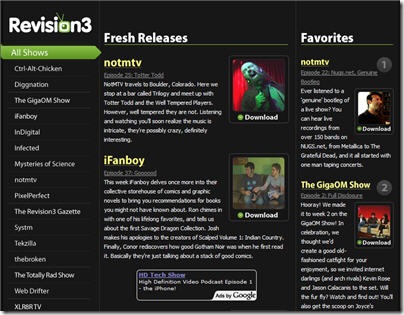
Revision3.com is the first media company that gets it, born from the Internet, on-demand generation. Unlike aggregators, mash-ups, and user-generated video sites, Revision3 is an actual TV network for the web, creating and producing its own original, broadcast quality shows.
Star Trek: New Voyages fan-produced Star Trek episodes, distributed with torrents.
tlm-project.org represents the Linux Mirror Project, helping spread the alternative operating system.
Torrent Information
Brian’s BitTorrent FAQ clears up a lot of commonly asked questions about BitTorrent.
Magoo’s Guide To BitTorrent is a complete instruction. \here you can find answers to the following topics: how to install and use BitTorrent, common problems downloading with BitTorrent, and others.
Slyck.com provides Web File-Sharing and Tech news.
TorrentFreak.com is a weblog dedicated to bringing the latest news about BitTorrent and everything that is closely related to this popular filesharing protocol. TorrentFreak aims to be a credible news source.
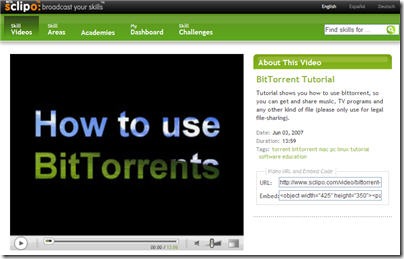
Video Tutorial shows you how to use BitTorrent, so you can get and share music, TV programs and any other kind of file (only use for legal file-sharing).
Vlad44.com FAQ is a BitTorrent FAQ that covers questions about torrents such as BitTorrent errors, how to make your own torrents, how to configure web server for .torrent files, and others.
Wikipedia entry on BitTorrent explains how BitTorrent works, creating and publishing torrents, some of the history, legal issues, and other.
Torrent Clients
ABC Client is an improved client for the Bittorrent peer-to-peer file distribution solution. ABC is based on BitTornado which extended from from Original Bittorrent Core System , coded by Bram Cohen. Operating System: Windows 98/ME/NT/2000/XP, Linux (Beta).
Acquisition is torrent client, which allows to share files with tens of millions of Mac and Windows users around the planet. Requirements: Mac OS X 10.4 Tiger.
Arctic Torrent is an Open Source minimal BitTorrent client. It won’t have all the pretty features that other Torrent apps have, but focuses on low memory and cpu usage. Because it was written in C++, you dont get the high memory requirements of Java or high CPU usage of Python. Arctic is tested on Windows XP and should work on 2000, XP, and 2003 in 32-bit and 64-bit. It uses Unicode and thus will not run on Windows 9x.
Azureus implements the BitTorrent protocol using java language and comes bundled with many invaluable features for both beginners and advanced users. Runs on all operating systems.
BitComet is a BitTorrent/HTTP/FTP download management software, which is powerful, fast, very easy-to-use, and completely free. It contains many advanced features for BitTorrent download and extends its leading BitTorrent technology to HTTP/FTP to accelerate downloading up to 5 – 10 times faster, or more. Runs on Windows 2000/XP/2003/Vista. Windows 98/Me can use the ZIP version.
BitLord is a powerful C++ BitTorrent Client. BitLord is a p2p file-sharing freeware program fully compatible with Bittorrent, which is the most popular p2p protocol designed for high-speed distribution of 100MB or GB sized files. It supports simultaneous downloads, download queue, selected downloads in torrent package, fast-resume, chatting, disk cache, speed limits, port mapping, proxy, ip-filter, etc.Works with Windows 98/ME/2000/XP/2003.
BitSpirit is a powerful and easy-to-use BitTorrent client. It supports simultaneous downloads, download queue, UPNP port-maping, NAT traversal(UDP transport), select downloads from multiple files torrent package, disk cache, chatting with other peers, torrent market,ip-filter, etc. Runs on Windows 98/Me/2000/XP/2003.
BitTornado is a BitTorrent client. Works on Windows, Linux, OS X, BSD.
BitTorrent for Windows brings together BitTorrent’s proven expertise in networking protocols with µTorrent’s efficient implementation and compelling UI to create a better BitTorrent client.
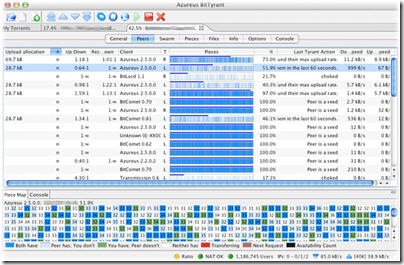
BitTyrant is a new, protocol compatible BitTorrent client that is optimized for fast download performance. Works with Linux, OS X, and Windows.
Bits On Wheels is the first 100% Native BitTorrent client for the Macintosh.It is completely written in Objective-C and Cocoa. Bits on Wheels is currently a Freeware. It is not Open Source nor public domain.
Deluge is a bittorrent client for Linux and other Unix-Like operating systems. It was created with the intention of being lightweight and unobtrusive. The code is 100% open to the public.
Enhanced cTorrent is a BitTorrent client implemented in C++ to be lightweight and quick. Enhanced CTorrent is intended to run on any Unix-like system, including FreeBSD, Linux, Mac OS X, Solaris, Cygwin, etc.
FlashGet is a leading download manager and has the highest amount of users on the Internet. It uses MHT(Multi-server Hyper-threading Transportation) technique, supports various protocols and has excellent document management features. FlashGet is a freeware without any adware or spyware.
FoxTorrent is the open source FoxTorrent Firefox extension that lets you stream torrents as they download, from your web browser, with zero configuration needed.
KTorrent is a BitTorrent program for KDE. Runs on Linux and OS X.
Opera is the fastest, and most secure free Web browser available. You don’t need a separate BitTorrent application to download large files. Simply click a torrent link and start the download.
qBittorent project was created with the idea of developping a new Bittorrent client for Linux that would be easy to use, good looking, featureful but lightweight. qBittorrent is a free software. For Linux and OS X.
QTorrent is a BitTorrent client that uses the Qt widget-set. It allows you to have several torrents open at the same time from within the same program window, offering you easy overview, access and management through a list-mode. Every torrent also has it’s own page where you can control things like upload speed and upload slots. A page that shows some statistics of all open torrents is also available.
rTorrent is a a BitTorrent client for ncurses, using the libtorrent library. The client and library is written in C++ with emphasis on speed and efficiency, while delivering equivalent features to those found in GUI based clients in an ncurses client.
Tomato Torrent is a Macintosh BitTorrent client.
Torrent Swapper is an open source sociable peer to peer file-sharing client based on the Bittorrent protocol that is ideal for high-speed distribution of large files that has a basic understanding of human friendships, of user tastes in content, and of Internet connectivity between users. Torrent Swapper supports simultaneous downloads, download queue, selected downloads in torrent package, fast-resume, disk cache, speed limits, port mapping, proxy, ip-filter, etc. Works with Linux, OS X and Windows.
Transmission a lightweight, yet powerful BitTorrent client. Its simple, intuitive interface is designed to integrate tightly with whatever computing environment you choose to use. Available for Linux and OS X.
μTorrent is a BitTorrent client that includes bandwidth prioritization, scheduling, RSS auto-downloading and Mainline DHT (compatible with BitComet). Additionally, µTorrent supports the Protocol Encryption joint specification and peer exchange. Windows only.
WizBit is a BitTorrent client for Symbian S60 smartphones (such as the Nokia 6680, 7610, 6600, N70, N80, N91 or many more). It uses Python, which is available for free.


 Subscribe